Detailed mode replaces one big judgement with many small, concrete ones. Available for CAF assessments; each objective gets its own page.
Ticking statements
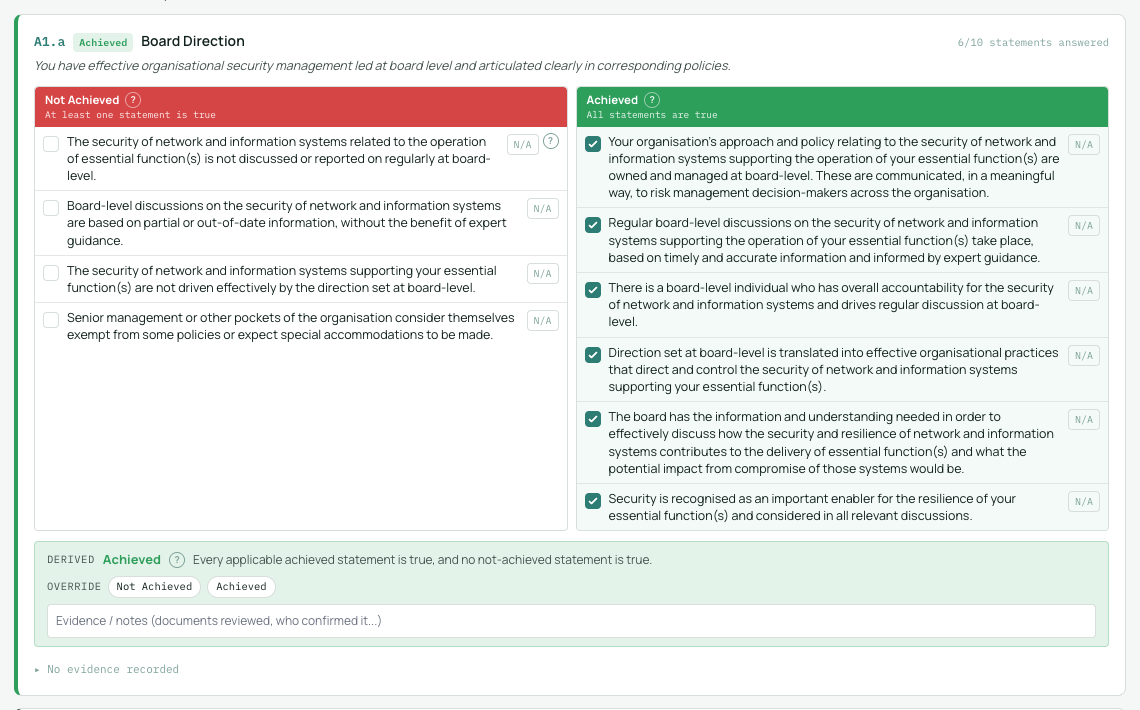
- Each outcome shows its indicators of good practice in their CAF columns: Not Achieved, Partially Achieved (where defined) and Achieved.
- Mark each statement true or false for your environment, or N/A with a justification if it genuinely cannot apply.
- Counters on each outcome show how many statements you have resolved.
How status is derived
XIRIQ derives the outcome status from your ticks, in this order: any Not Achieved statement marked true forces Not Achieved, even if the Achieved column is complete. Otherwise, all applicable Achieved statements true gives Achieved. Otherwise, where the outcome has a Partially Achieved column and all its statements are true, Partially Achieved. N/A statements are excluded from these completeness checks.
The indeterminate state
If none of those rules land, the outcome shows assessor judgement required rather than a guessed status. XIRIQ never silently downgrades an incomplete outcome; an indeterminate state is information, telling you the ticks alone cannot settle it.
Overriding with a justification
You can override any derived status with your own judgement, and a justification is required when you do. Overridden outcomes are tagged in the app and in reports, so a reader always sees both what the indicators said and what the assessor concluded.