Adding evidence is deliberately light: two fields and you are done. Detail can come later or never.
The two required fields
- On any outcome in the Assessment tab, expand the evidence line and choose to add a new record.
- Enter a title (for example, OT Security Policy) and what it demonstrates (for example, board-approved policy covering OT exists).
- Save. The record is created and linked to that outcome in one step.
Optional detail
Behind the add-detail toggle: a document reference (OT-POL-004), type and status, location (where the document lives), owner, version, document date and a review-due date that drives staleness flags. All of it can be added later by editing the record in the Evidence tab; edits propagate everywhere the record is linked.
Where to add records
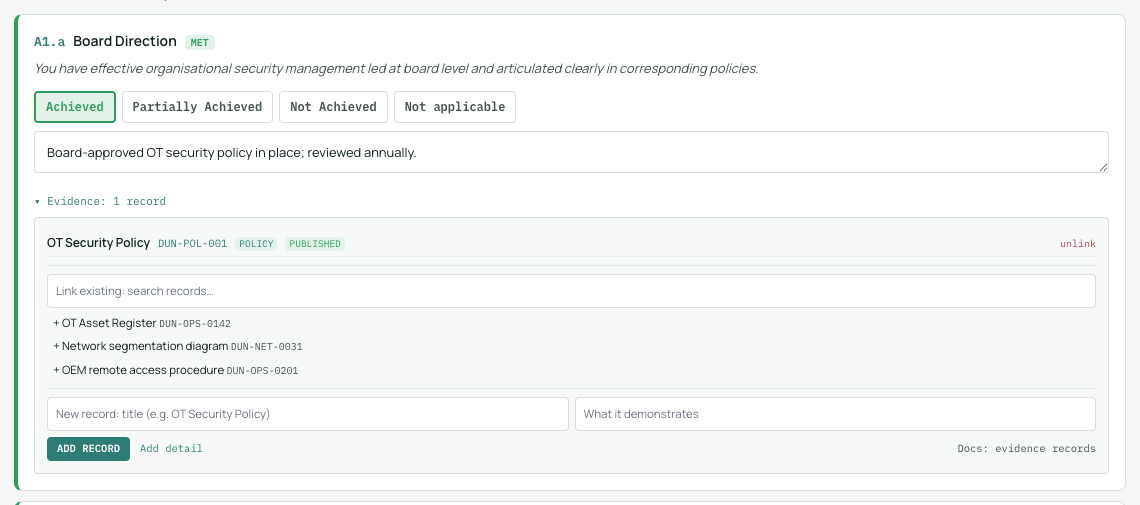
Two places, same register: from an outcome's evidence panel while assessing (created linked to that outcome), or from the Evidence tab in bulk (created unlinked, for linking later). When a record already exists, link it to further outcomes instead of creating a duplicate: the panel's link-existing search and the link picker both do this without retyping anything.